Version 2.4 – September 2026
Contents
- Introduction
- Integration overview
- Authentication
- API Services
- InvoiceDoc description
- Additionals
- Technical and operational errors
- Reference tables
- Document structure, examples and tools
- Versions history
- Introduction
This document describes the above services and the technical specifications necessary to implement the relevant calls
of the REST API interface. Specifically, for an enterprise using an information system that uses the relevant API, the features offered are:- Send data for the documents it issues.
- Retrieve documents already transmitted for the issuer VAT via RequestTransmittedDocs.
The following technologies are used to establish a connection with the interface.
- HTTPS – Secure HTTP
- Web service
- REST API – REST interface required for data reporting process.
- XML – eXtensible Markup Language
The interface is accessible to any invoicing program capable of sending HTTP messages and creating schema- conformant
XML, as specified in the present specification.In addition to the relevant data, the software should be able to simultaneously and automatically send the necessary
information to identify the user through the same HTTPS call. - Integration overview
Requirements- All XML files must be well-formed, adhere to the schema (XSD), and be encoded in UTF-8.
- Be secured using authentication described in next chapter.
- When you include classification in the XML (
InvoicesDoc), declare onlyxmlns:N1on the root — neverxmlns:N2and neverN2:…elements (e.g.N2:classificationType). This is required for the SBZ provider API (unlike direct ERP submission to AADE, where the XSD declares both N1 and N2). If you sendN2,doc.php/sendinvoice.phpreturns a validation error (Namespace prefix N2 on classificationType is not defined).- Income documents (issuer, e.g.
1.1,1.2,11.1…):
1xmlns:N1="https://www.aade.gr/myDATA/incomeClassificaton/v1.0"incomeClassification,category1_*codes (myDATA §8.8–8.9). - Expense documents (e.g.
2.1,2.2,2.3,2.4— service/purchase invoice):
1xmlns:N1="https://www.aade.gr/myDATA/expensesClassificaton/v1.0"expensesClassification,category2_*codes (myDATA §8.10–8.11).
Example:
<invoiceType>2.1</invoiceType>→ always the expenses schema onN1. Qualified elements (N1:classificationType,N1:amount, etc.) always use theN1prefix only. - Income documents (issuer, e.g.
Certification Process
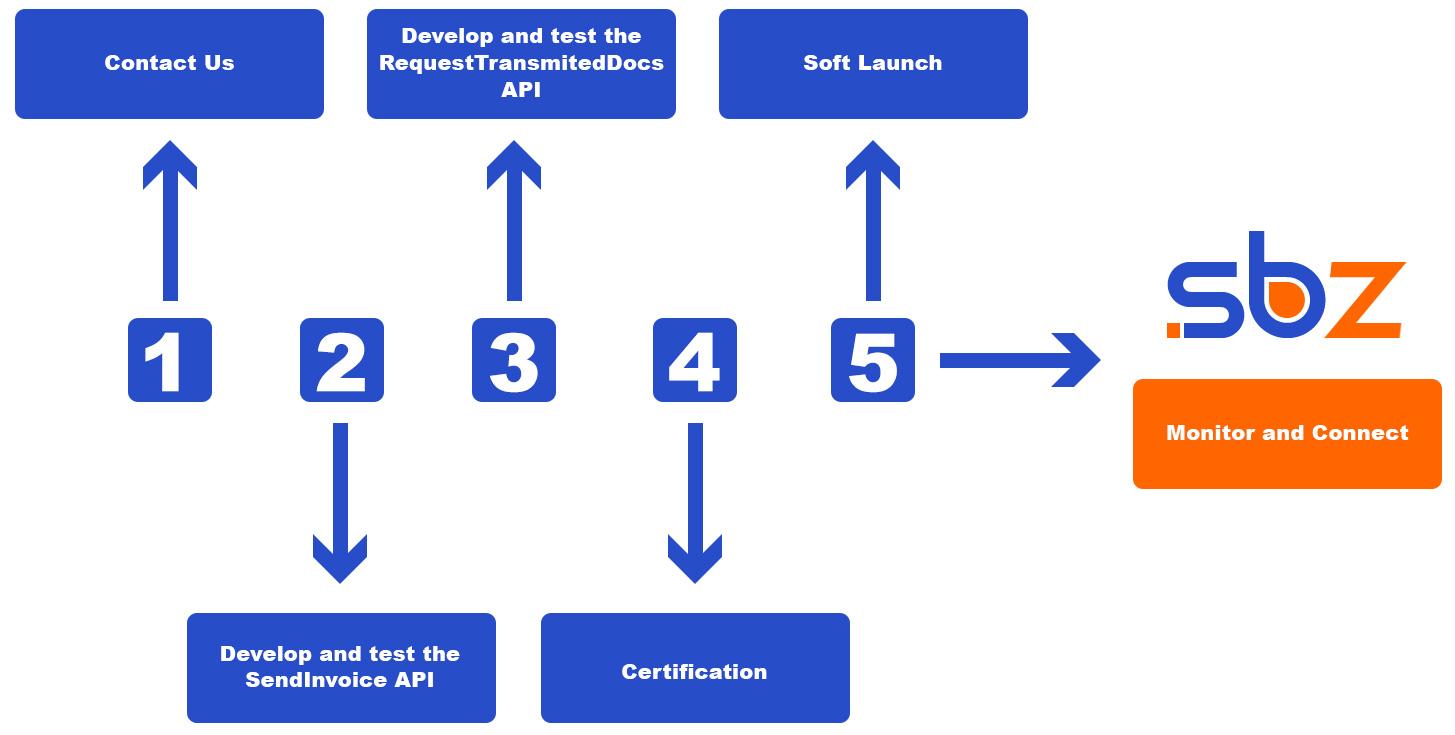
- Create an account on https://api.sbz.gr/register.php and contact our technical department at support@sbzsystems.com to activate your trial account.
- Develop and test the APIs.
- Check and make sure you do not receive any errors. Testing for this API consists of self-tests conducted using your test account in a sandbox environment.
- Integration testing. When you are ready to test, contact the SBZ systems Integration Specialist assigned to your account for access to the guides and testing tools.
- When everything goes right then your setup is ready, and you will receive the production API- KEY and account details.
- After review by SBZ staff, an electronic contract is issued.
After launch
- You must continue to adhere to our Terms and Conditions.
- You should monitor your API connection for any warning or errors.
- Report any warning or errors received in any response and how they have been resolved.
- Authentication
Each call must contain the following headers in the form of pair-values, which is necessary for user identification. In case of incorrect information, the user will receive an error message. The following headers are required:
Key Data Type Value Required Description Api-Key String {Api-Key} Yes Your sandbox or production Api-Key Content-Type String application/xml; charset=utf-8 Yes* For calls with an XML body. For sendfile.phpusemultipart/form-data(e.g. curl-F) — not application/xml.By identifying the user through the headers, the interface will also gain access to the VAT number the user had stated when registering, so that it would not be necessary to submit it in every call.
Please note each call to a new vat number must first be authorized from our side.
- API Services
- Send invoice
The call has the following characteristics:- /sendinvoice.php (POST)
- XML body with an
InvoicesDocelement (type AadeBookInvoiceType). SBZ processes one document per call. - Headers as in Authentication (
Api-Key,Content-Type: application/xml; charset=utf-8).
Required SBZ API elements in the XML
API_InvoiceDetails,API_Issuer,API_Counterpart,API_AdditionalslineUnitPrice,totalNetPriceBeforeDiscount,totalDiscountValue,measurementUnitLabel,vatCategoryPercent,docTime- at least one of
itemCodeorlineCode, and one ofitemDescrorlineDescription, based on documentation.
Delivery notes (type 9.x or
isDeliveryNote=true)- Always send
otherDeliveryNoteHeaderwithloadingAddressanddeliveryAddress. InAddressType,postalCodeandcityare mandatory. - A PartyType address (issuer/counterpart) does not replace
deliveryAddress. - For 10.x (quantitative receipt) do not send
otherDeliveryNoteHeaderbut onlymovePurposeas described in the API. - For line code and description,
itemCodeanditemDescrrequired.

Endpoints
Production environment
https://api.sbz.gr/sign/sendinvoice.php?action=production
Sandbox environment
https://api.sbz.gr/sign/sendinvoice.php?action=sandbox
When you use the submission service (sendinvoice.php/ SendInvoices), you receive an SBZResponseDoc XML response. The
object contains a list of response elements, one for each entity submitted.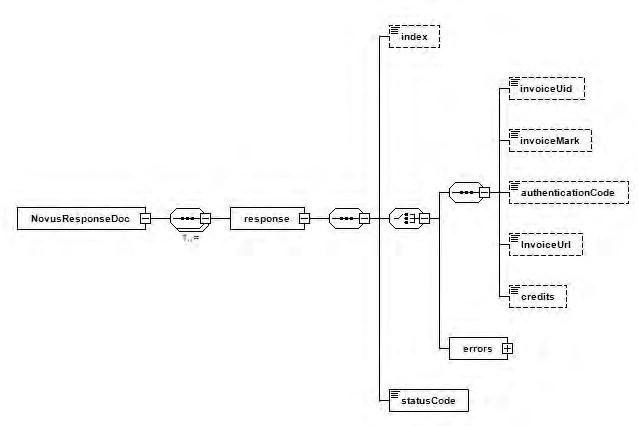
Field Type Description Index xs: int Entity’s line number inside the submitted xml invoiceUid xs: string Invoice identifier invoiceMark xs: long Unique Invoice Registration Number AuthenticationCode xs: string Signature InvoiceUrl xs: string The url to get the invoice myDATAUrl xs: string The link leading to the IAPR document Errors ErrorType Errors list units xs: long Units available for use statusCode xs: string Status code Remarks
- The type of response (success or failure) is determined by the value of the statusCode field.
- If successful, the statusCode field has value Success and the answer contains the corresponding values for the invoiceUid and invoiceMark fields for each entity submitted.
- In case of failure, the statusCode field has a value corresponding to the type of error, and the response includes a list of ErrorType error data for each entity that failed to submit. All errors by entity are in the same category that characterizes the response.
- Field invoiceUid is returned only when the submitted entity was invoice.
- Field classificationMark is returned only when the submitted entity was classification.
- The authenticationCode field returns if the submission was made through a provider
- The cancellationMark field returns only if the request was for cancellation of a document
- The invoiceMark field contains the mark of the submitted invoice in case of submitted invoices and the mark of the invoice to which the submitted markings related, in case of submitted markings
- The qrUrl field returns only on submissions of document types 1.1 to 11.5
- Payment signature
The call has the following characteristics:- /paymentsignature.php (POST)
- Main part in xml format containing the ERPpayment node, which contains a payment signature request for use with a POS card terminal.
Field Type Required Description issuerVat xs:long Yes Entity VAT number issueDate xs:date Yes Invoice issue date branch xs:int Yes Branch number invoiceType xs:string Yes Type of invoice. The possible values are described in the Reference tables. The documents 8.5, 11.4, 5.1, 5.2 send to the terminal a refund transaction.
The document 8.4 pre-loading transaction unless preload is setInitialTransaction xs:string No Mandatory only in case of refund series xs:string Yes Series of invoices. If no invoice series is issued, the field must have the value 0
It must not contain the character “-“aa xs:string Yes serial number of invoice. It must be unique per type of document 8.1 invoicemark xs:long No Unique Registration Number amount xs:decimal Yes Payment amount totalNetValue xs:decimal Yes Total net value totalVatAmount xs:decimal Yes Total amount of VAT totalGrossValue xs:decimal Yes Total gross value terminalid xs:string Yes Payment instrument alias as defined in api.sbz.gr tipAmount xs:decimal No Tip value. If not defined enter 0 instalments xs:int No Number of installments. If not defined, enter 0 preload xs:int No 1: Pre-load transaction, 2: Check pre-loaded
Deploy the line only when needed.PaymentType xs:int No 0: Card payment, 1: IRIS. If not defined, is 0 Response
Field Type Description SigningAuthor xs:long Electronic invoicing provider’s code Signature xs:date Payment Signature of the Electronic Document Issuance Service Provider Uid xs:int Invoice identifier Timestamp xs:int Time format Y-m-dTH:i:s statusCode xs:string Result of call Comments xs:string Comments pos_transactionId xs:string Terminal transaction ID pos_answer xs:string Returned values are preloaded, success, failed pos_transactionText xs:string It is not returned by all terminals and is intended for informational purposes only. An additional unique number from a terminal, if exists. pos_TerminalID xs:string Terminal ID pos_PaymentType xs:int 0: Card payment, 1: IRIS payment
Remarks:- The differentiation between simultaneous and heterochronous transactions lies in the use or not of SendPayments
- For heterochronous transactions SendPayments is used after first calling PaymentSignature
- For simultaneous transactions SendInvoice is used after first calling PaymentSignature
- The issuer VAT is sent via the
issuerVatfield insideERPpayment
Endpoints
Production environment
https://api.sbz.gr/sign/paymentsignature.php?action=production
Sandbox environment
- Send payments
The call is made when we need to issue a receipt or POS return receipt. It is sent to myDATA with SendPaymentsMethod and receives an invoiceMark which is returned on a successful call. A call has the following characteristics:- /sendpayments.php (POST)
- Headers as referred to in paragraph 3
- XML body is
PaymentMethodsDocwith one or morepaymentMethods/PaymentMethodTypeelements. Fields are described below (diagram):
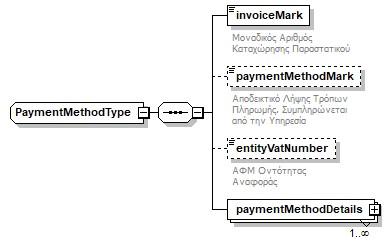
Request (PaymentMethodsDoc / PaymentMethodType)Field Type Required Description invoiceMark xs:long Yes Unique Invoice Registration Number (MARK) paymentMethodMark xs:long No Unique Payment Method Registration Number (filled by the service) entityVatNumber xs:string No Optional AADE schema field. SBZ identifies the issuer from the Api-Key(not required for the call).paymentMethodDetails PaymentMethodDetailType Yes Payment methods (at least one POS type per document)
Remarks-
- The field paymentMethodMark is composed by the service
- The issuer is identified from the
Api-Key; optional AADEentityVatNumberis not used by SBZ for authentication. - The PaymentMethodDetailType object is discussed in detail in paragraph 5.2
- When using the method, at least one PaymentMethodDetailType object per document must be of type POS
- The total amount per PaymentMethodDetailType object must be equal to the totalGrossValue of the document to which the invoiceMark refers.
EndpointsProduction environment
https://api.sbz.gr/sign/sendpayments.php?action=production
Sandbox environment
- Cancel delivery note
The call is made when we need to cancel a delivery note. It is sent to myDATA with the CancelDeliveryNote method and receives a cancellationMark, which it returns upon a successful call. It has the following characteristics:- /canceldeliverynote.php (POST)
- Headers as referred to in paragraph 3
- Fields are defined as parameters, for example https://api.sbz.gr/sign/canceldeliverynote.php?action=sandbox&entityVatNumber=999999999&mark=40000000000000
Field Type Required Description mark xs:long Yes Unique registration number of the document to be canceled entityVatNumber xs:string Yes Entity VAT number Response (
SBZResponseDoc/response)Field Type Description cancellationMark xs:long Unique Cancellation Number (on success) statusCode xs:string Status code (e.g. Success) message xs:string Success or error message
Remarks:- No XML body is required (empty POST body). Fields are query parameters only.
- The
Api-Keymust match the same VAT asentityVatNumber. - The MARK must already exist for that account; otherwise
statusCode301. - On success the cancellation gets its own mark (
cancellationMark). Other example codes: 5006 (key), ValidationError (missing params), 101 / 7002 / 7003. - Only document type 9.3 can be canceled with CancelDeliveryNote (AADE rule).
EndpointsProduction environment
https://api.sbz.gr/sign/canceldeliverynote.php?action=production
Sandbox environment
https://api.sbz.gr/sign/canceldeliverynote.php?action=sandbox
- Send file
The call has the following characteristics:- /sendfile.php (POST)
- Headers as referred to in paragraph 3
- Body (multipart/form-data)
Field Type Required Description issuerVat xs:long Yes Entity VAT number invoiceMark xs:string Yes Document Mark file xs:string Yes PDF or JPG file (max 300 KB) Example
123456curl -X POST-H "Api-Key: your_key"-F "issuerVat=999999999"-F "invoiceMark=400001000000000"-F "file=@invoice.pdf""https://api.sbz.gr/sign/sendfile.php?action=sandbox"Endpoints
Production environment
https://api.sbz.gr/sign/sendfile.php?action=production
Sandbox environment
https://api.sbz.gr/sign/sendfile.php?action=sandbox
Response (
SBZResponseDoc/response) on success includes among others:invoiceMark,vat,fileName,filePath,unitsDeducted,remainingUnits,statusCodeSuccess.
RemarksissuerVatmust match the VAT of theApi-Key.- The document mark must already exist in the system before uploading.
- PDF and JPG/JPEG are allowed (max 300 KB).
- Each upload costs units: 1 unit per 20 KB (e.g. 100 KB = 5 units).
- Re-upload for the same MARK/environment is not allowed (
statusCode102). Other examples: 101 (validation), 404 (not found), 405 (not POST), 5006 (key), 7002 (storage/DB).
- Send invoice
- InvoiceDoc description
This section describes in detail the contents of an invoice (type AadeBookInvoiceType). The structure of the element is as follows: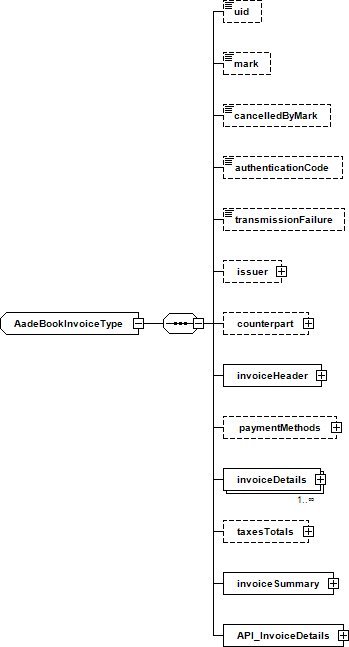
Field Type Required Description Valid values uid xs:string No Invoice identifier Length = 40 Filled in only by Provider mark xs:long No Unique Invoice Registration Number Filled in only by Provider. Unique Invoice Registration Number cancelledByMark xs:long No Unique Invoice Cancelation Number Filled in only by Provider authenticationCode xs:string No Authentication Code Filled in only by Provider transmissionFailure xs:byte No Provider communication failure or ERP data transmission failure Allowed value: 1. Details in the Reference tables issuer PartyType No Invoice issuer counterpart PartyType No Invoice counterpart invoiceHeader InvoiceHeaderType Yes Invoice header paymentMethods PaymentMethodDetailType No Payment Methods invoiceDetails InvoiceRowType Yes Invoice lines taxesTotals TaxesType No Total taxes Contains all taxes except VAT. If user uses this element, taxes will not exist in invoiceDetails invoiceSummary InvoiceSummaryType Yes Invoide Summary API_InvoiceDetails API_InvoiceDetailsType Yes Document details Remarks
- Complex types PartyType, PaymentMethodDetailType, InvoiceHeaderType, InvoiceRowType, TaxTotalsType, InvoiceSummaryType and API_InvoiceDetailsType are described later in this section.
- The transmissionFailure field indicates a communication failure (optional, xs:byte). Allowed value: 1 — Failure of communication between the entity and the provider during invoice issuance/transmission. Details in the Reference tables.
- Entity details – Address
The issuer and the counterpart are elements of type PartyType.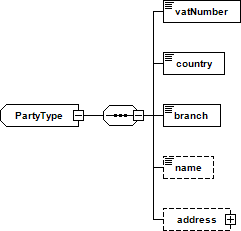
Field Type Required Description Valid values vatNumber xs:string Yes VAT number Any valid VAT number Country xs:string Yes Country code Country codes (ISO 3166) Branch xs:int Yes Branch number Min value = 0 If the branch is headquarters or doesn’t exist, the branch field must have a value of 0. Name xs:string No Name Address AddressType No Address documentIdNo xs:string No Official document number Max.100 chars Valid only in the case of a tax free document (specialInvoiceCategory = 4) supplyAccountNo xs:string No Electricity Supply Number Max.100 chars Valid only in the case of a fuel documents Remarks
- For the issuer fields name and address are valid only in case the entity is not from Greece. For the counterpart field name must not be submitted if the entity is from Greece.
- The country code is two characters and comes from the respective country list of countries as described in ISO 3166.
- In case the issuer’s establishment is the headquarters or does not exist, the branch field must have the value 0
- For the publisher, the Name and Address details are not accepted in cases involving an entity within Greece (GR). For the receiver, the element Names are not accepted in the event that it concerns an entity within of Greece (GR)
- The official document number is only allowed in the case of transmission of documents belonging to the Special Category of Tax free Document (the field of the document header specialInvoiceCategory has the value 4), and can be any official identification document (eg number passport) of the recipient of the document.
- The Electricity Supply number is only allowed in the case of transmission of fuel documents (the field of the document heading fuelInvoice has the value true – only accepted for transmission by providers) and is information of the recipient of the document.
AddressThe address of the issuer and the counterpart are elements of type AddressType.
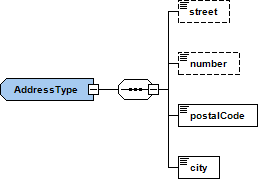
Field Type Required Description street xs:string No Street number xs:string No Number postalCode xs:string Yes Postal code city xs:string Yes City - Payment Method
Payment method is an element of type PaymentMethodDetailType and its structure is described below: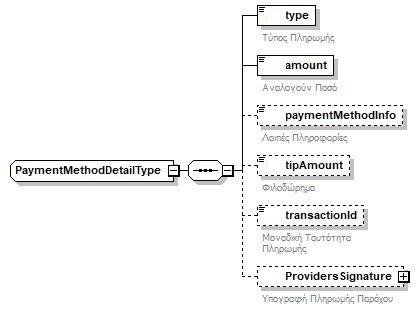
Field Type Required Description Valid values type xs:int Yes Payment method Min value = 1
Max value = 8. Possible values are described in the Reference tables (Payment methods)Amount xs:decimal Yes Amount Min value = 0
Decimal digits = 2 Field amount may refer to fraction of the document’s total valuepaymentMethodInfo xs:string No Information Field paymentMethodInfo contains additional information for the specified type transactionId xs:string Όχι Transaction number from POS terminal Passed on in the case of payments with type = 7 tid xs:string Όχι POS terminal TID Passed on in the case of payments with type = 7 Remarks
- The values of the type field are described in the corresponding Reference tables
- The amount field may correspond to part of the document’s total value
- The paymentMethodInfo (Info) field may contain additional information for the specific type (e.g. bank account number)
- The ProvidersSignature field is of type ProviderSignatureType (described below) and is transmitted for payments with type = 7 when submission goes through the provider channel
- Provider’s Payment Signature
The ProvidersSignature field is an element of type ProviderSignatureType and its structure is described below: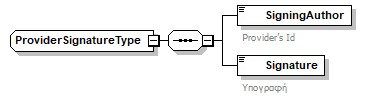
Field Type Required Description SigningAuthor xs:string Yes Number of approval of the Electronic Invoicing Provider Signature xs:string Yes Sign - Payment flow
- Call to paymentsignature.php with an XML request:
1234567891011121314<ERPpayment><issuerVat>999999999</issuerVat><issueDate>2025-03-07</issueDate><branch>0</branch><invoiceType>11.1</invoiceType><series>Δ</series><aa>3468</aa><amount>165</amount><totalNetValue>133.07</totalNetValue><totalVatAmount>31.93</totalVatAmount><totalGrossValue>165</totalGrossValue><tipAmount>0</tipAmount><terminalid>CARD3</terminalid></ERPpayment>The terminalid is associated with the terminal TID in the api.sbz.gr admin panel, under settings, payment terminals.
- The API communicates with the POS and waits for a response
- When the transaction completes, XML of this type is returned:
123456789101112131415<ERPpayment><response><SigningAuthor>013</SigningAuthor><Signature>30450220023dbd64e2244c3fafc4e688d37de63bxxxxxxxxxxxxxxxxxxxxxxxxxxxx</Signature><Uid>F4AD151F318B012XXXXXXXXXXXXXXXXXX</Uid><Timestamp>20260509095253</Timestamp><statusCode>Signature is valid</statusCode><Comments>803093207-2026-05-09-0-11.1-A-10159|0|F4AD151F318B012E6CF…..</Comments><pos_transactionId>tr2;109;000222;000012;481070</pos_transactionId><pos_answer>success</pos_answer><pos_transactionText>34861241</pos_transactionText><pos_TerminalID>74900178</pos_TerminalID><pos_PaymentType>0</pos_PaymentType></response></ERPpayment> - Embed into sendinvoice.php and submit
12345678910111213141516171819202122232425262728<invoice>...<paymentMethods><paymentMethodDetails><type>3</type><amount>0</amount></paymentMethodDetails><paymentMethodDetails><type>7</type><amount>15.88</amount><tipAmount>0</tipAmount><transactionId>tr2;109;000222;000012;481070</transactionId><tid>74111111</tid><ProvidersSignature><SigningAuthor>013</SigningAuthor> <Signature>30450220023dbd64e2244c3fafc20c39f52e57b64f676cfc2185733dxxxxxxxxxxxxxxxxxxxxxxxxx</Signature></ProvidersSignature></paymentMethodDetails></paymentMethods><invoiceDetails>...</invoiceDetails><API_InvoiceDetails>...</API_InvoiceDetails><invoiceSummary>...</invoiceSummary></invoice>
- Call to paymentsignature.php with an XML request:
- Document header – Other General Delivery Details
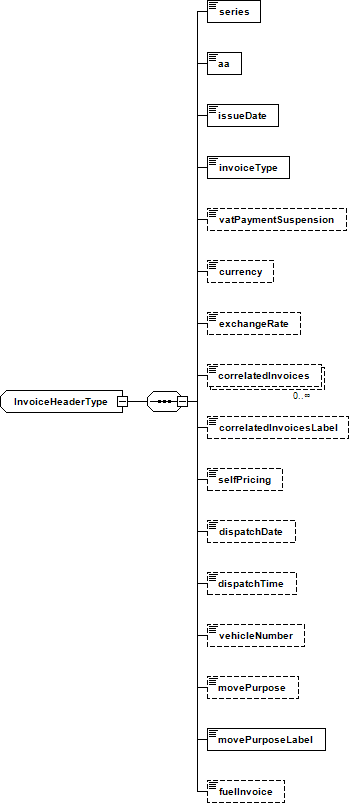
Field Type Required Description Valid values series xs:string Yes Invoice series In case of non-issuance of series of an invoice, the series field must have a value of 0
It must not contain the character “-“aa xs:string Yes Invoice’s serial number Maximum digits = 5 issueDate xs:date Yes Invoice’s issue date invoiceType xs:string Yes Invoice type The possible values are described in the Reference tables vatPaymentSuspension xs:boolean No VAT payment suspension currency xs:string No Currency Currency code (ISO4217) exchangeRate xs:decimal No Exchange rate Min value = 0 Decimal digits = 5 The currency exchange rate against euro. It should be completed only when the currency is not EUR. correlatedInvoices xs:long No Correlated invoices The element is a list of strings containing the MARK of the associated invoices identifiers correlatedInvoicesLabel xs:string No Correlated invoices Names Required only when using correlatedInvoices. The element is a text field containing the Friendly Name of the associated invoices selfPricing xs:boolean No Self-billing indication Specifies if it is self-billing invoice dispatchDate xs:date No Dispatch date dispatchTime xs:time No Dispatch time vehicleNumber xs:string No Vehicle number movePurpose xs:int No Purpose of movement Min value = 1 Max value = 20 Values described in the Reference tables movePurposeLabel xs:string No Purpose of Movement Description fuelInvoice xs:boolean No Fuel document (indication) specialInvoiceCategory xs:int No Special Category of Document Min value = 1 Max value = 13. Values in the Reference tables (Special invoice category) isDeliveryNote xs:boolean No Delivery note indicator multipleConnectedMarks No Multiple connected Unique Invoice Registration Numbers tableAA Yes Table ID Acceptable only for document type 8.6 – Maximum permissible length 50 totalCancelDeliveryOrders xs:boolean No Total Cancellation Indicator of Delivery Notes Acceptable only for document type 8.6 Remarks
- The exchangeRate field is the exchange rate of the currency in relation to the euro. Must be filled in only when the currency does not have a EUR value.
- The currency code is derived from the corresponding list according to the ISO4217 standard.
- The correlatedInvoices element is a list and contains the MARKs of the correlated documents
- In the case of no document series being issued, the series field must have the value 0
- The selfPricing field defines whether it is a Self-Pricing Invoice
- The possible values of the movePurpose and invoiceType fields are described in detail in the corresponding Reference tables
- The field fuelInvoice defines whether it is a document of sale of liquid fuel and is allowed to be sent only in the case of providers.
- The possible values of the specialInvoiceCategory field are described in detail in the corresponding Reference table
- The possible values of the invoiceVariationType field are described in detail in the corresponding Reference table. This field is not allowed for transmission via the provider channel. Also details on how to use them from an operational point of view are described in the relevant operational document.
- The otherCorrelatedEntities field (Other correlated entities) is a list of type EntityType
- The structure of the otherCorrelatedEntities type is described below
- The structure of the otherDeliveryNoteHeader type is described below
- The isDeliveryNote field indicates whether the document is also a delivery note (e.g. document type 1.1 – Sales Invoice; if isDeliveryNote = true, it is also a delivery/dispatch note and additional delivery details must be sent)
- The otherMovePurposeTitle field is filled when movePurpose = 19 (Other movements) and sets the title of the other movement
- The thirdPartyCollection field indicates whether the business using Payment Means as a payment-services user collects on behalf of third parties (document type 8.4 – POS Collection Receipt) or returns transaction amounts on behalf of third parties (document type 8.5 – POS Refund Receipt)
Other General Delivery Details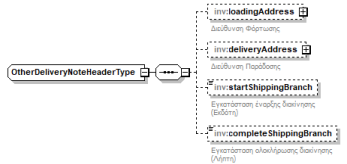
Field Type Required Description Valid values loadingAddress AddressType Yes Loading Address It is completed for documents that are delivery notes (e.g., 9.3) or invoices and delivery notes (isDeliveryNote = true) deliveryAddress AddressType Yes Delivery Address It is completed for documents that are delivery notes (e.g., 9.3) or invoices and delivery notes (isDeliveryNote = true) startShippingBranch xs:int No Dispatching Start Location (Issuer) It is completed for documents that are delivery notes (e.g., 9.3) or invoices and delivery notes (isDeliveryNote = true) completeShippingBranch xs:int No Receiving End Location (Recipient) It is completed for documents that are delivery notes (e.g., 9.3) or invoices and delivery notes (isDeliveryNote = true) Remarks:
- The field loadingAddress is of type AddressType, which type is elaborated in a previous corresponding paragraph (Entity Address)
- The field deliveryAddress is of type AddressType, which type is elaborated in a previous corresponding paragraph (Entity Address)
- The field startShippingBranch specifies the branch from which the circulation begins, in case the circulation starts from a branch (installation) of the issuer of the document, which is different from the issuer’s branch for the delivery note
- The field completeShippingBranch specifies the branch where the circulation will be completed, in case the circulation will be completed at a branch (installation) of the recipient of the document, which is different from the recipient’s branch for the delivery note
- In
loadingAddress/deliveryAddressfill a realpostalCodeandcity(not-). A PartyType address alone is not enough. - Do not use
otherDeliveryNoteHeaderon 10.x (AADE error 205).
- Document details – Activity Undertaking Declaration
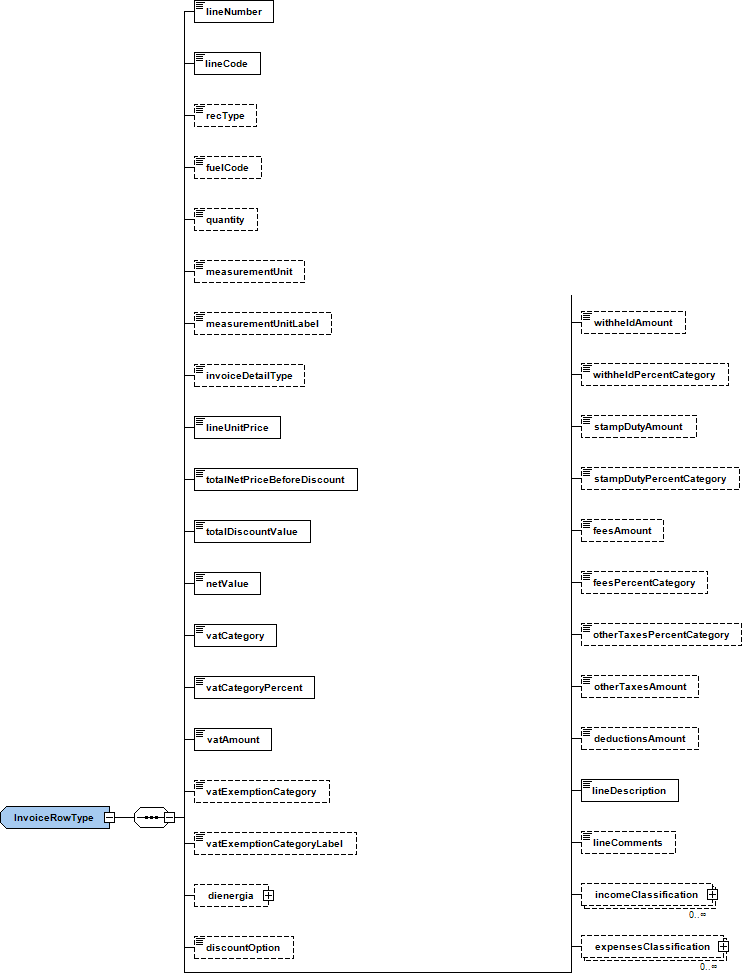
Field Type Required Description Valid values lineNumber xs:int Yes Line number Min value = 1 lineCode xs:string No Item code recType xs:int No Line Type Min value = 1 Max value = 7. Values in the Reference tables (Invoice detail type / line type) fuelCode FuelCodes No Fuel Code Fuel Codes list Values described in the Reference tables quantity xs:decimal No Quantity Min value = 0 Default = 1 lineQuantity xs:decimal No Quantity only for use by the provider API if the quantity does not exist Min value = 0 Default = 1 classificationIdentifier xs:string For B2G only
NoCPV code measurementUnit xs:int No Unit of quantity Min value = 1 Max value = 7. Values in the Reference tables measurementUnitLabel xs:string No Required only when measurementUnit exists invoiceDetailType xs:int No Self-billing remark 1,2 Values described in the Reference tables lineUnitPrice xs:decimal Yes The unit price totalNetPriceBeforeDiscount xs:decimal Yes Total price of all (units x quantity) totalDiscountValue xs:decimal Yes Total Discount Value Min value = 0 netValue xs:decimal Yes Net value Min value = 0 Decimal digits = 2 vatCategory xs:int Yes VAT category Min = 1, Max = 8 Values described in the Reference tables For cases where VAT is not applied, the vatCategory field will have the value of 8 vatCategoryPercent xs:decimal Yes VAT category Description (ex. 24.00) vatAmount xs:decimal Yes VAT amount Min value = 0 Decimal digits = 2 vatExemptionCategory xs:int No VAT exemption category Min value = 1 Max value = 31 Values described in the Reference tables Required if the vatCategory indicates a 0% VAT rate dienergia ShipType No Article 27 of POL 1177/2018 discountOption xs:boolean No VAT deduction right False / True
When False, it goes to code 310
When True, it goes to code 349withheldAmount xs:decimal No Withholding tax amount Min value = 0 Decimal digits = 2 Field is filled in when the corresponding tax exists (even if it is percentage) withheldPercentCategory xs:int No Withholding tax rate category Min value = 1 Max value = 12 Values described in the Reference tables stampDutyAmount xs: decimal No Amount of digital transaction fees Min value = 0 Decimal digits = 2 stampDutyPercentCategory xs:int No Digital Transaction Fee Category 1, 2, 3 Values described in the Reference tables feesAmount xs:decimal No Fees amount Min value = 0 Decimal digits = 2 Field are filled in when the corresponding tax exists (even if it is percentage) feesPercentCategory xs:int No Fees rate category Min value = 1 Max value = 22 Values described in the Reference tables otherTaxesPercentCategory xs:int No Other taxes rate category Min value = 1 Max value = 30 Values described in the Reference tables otherTaxesAmount xs:decimal No Other taxes amount Min value = 0 Decimal digits = 2 Field are filled in when the corresponding tax exists (even if it is percentage) deductionsAmount xs:decimal No Deductions amount Min value = 0 Decimal digits = 2 lineDescription xs:string lineComments xs:string No Line comments Filled in by user and used for information purposes only incomeClassification IncomeClassificationType No Income classification expensesClassification ExpensesClassificationType No Expenses classification itemDescr xs:string No Item description Max 300 chars Acceptable only in the case of documents of the special tax free category Remarks
- The possible values for the fields measurementUnit, invoiceDetailType, vatCategory, vatExemptionCategory, withheldPercentCategory, stampDutyPercentCategory, feesPercentCategory and otherTaxesPercentCategory are detailed in the respective Reference tables
- The field vatExemptionCategory is necessary in the event that vatCategory indicates a 0% VAT rate category
- For cases of accounting entries where VAT is not applied, the vatCategory field will have the value 8
- Line comments are filled in by the user and are used for information purposes to the service
- In the case of sending lines with recType = 2 (VAT fee line) and/or recType = 3 (Other Taxes line with VAT), it will be allowed at the same time, if desired, to send withholding/fees /other taxes/stamp/deductions and at document level and not necessarily per document summary line. In the cases of these lines, the amounts corresponding to VAT fees (recType = 2) or other taxes (recType =3 respectively, they will be sent to the field of the net value of the line (netValue), while the corresponding fields fee amount (feesAmount) or amount of other taxes (otherTaxesAmount) will not be filled. Also, other types of taxes/fees/retentions/stamps are not allowed to be sent on these lines (eg on a line with recType = 2 other taxes/deductions/withholding/stamp are not allowed on that line).
- Sending with recType = 7 (negative sign of values) is allowed only in the case of transmission of documents 17.3, 17.4, 17.5 and 17.6 and in this way it is indicated that the line values are negative (in the respective value fields the values are written in their absolute/positive values). It is noted that in the sums of the values in the Document Summary section (InvoiceSummaryType) the sums of the absolute values of the corresponding values of the lines will be transmitted regardless of whether there are lines that bear or not the indication recType = 7.
- The possible values for the fuelCode field are described in detail in the corresponding Reference table. It is allowed to send it only in the case of providers and if it is a document Fuel (invoiceHeaderType.fuelInvoice = true). The value 999 is used in the event that in a document other than fuel there is the need for invoicing and other charges. Only one line with this code is allowed per document and the net value of that line should be less than or equal to the sum of the net value of the remaining fuel codes of the document.
Activity Undertaking DeclarationActivity undertaking declaration is an element of type ShipType:
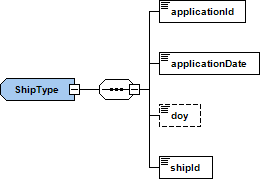
Field Type Required Description applicationId xs:string Yes Activity Undertaking Declaration Number applicationDate xs:date Yes Application date doy xs:string No Tax Return Filing DOY shipID xs:string Yes Ship details - Taxes totals
Element TaxTotalsType which contains the total taxes has the following structure: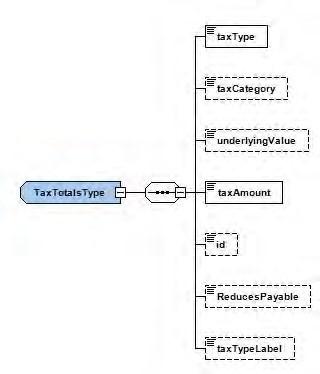
Field Type Required Description Valid Values taxType xs:byte Yes Type of tax 1 = Withheld taxes
2 = Fees
3 = Other taxes
4 = Digital transaction fee 5 = DeductionstaxCategory xs:byte Yes Tax category See tables 8.4 – 8.8 of appendix underlyingValue xs:decimal No Underlying value to which the tax refers Min value = 0
Decimal digits = 2percentage xs:decimal For B2G only
YesDeduction, withholding rate Min value = 0
Decimal digits = 2reason xs:string For B2G only
YesDeduction, withholding description taxAmount xs:decimal Yes Tax amount Min value = 0
Decimal digits = 2Id xs:byte No Line number ReducesPayable xs:boolean No Reduces the Payable amount Default = False taxTypeLabel xs:string No Description of the service - Document summary
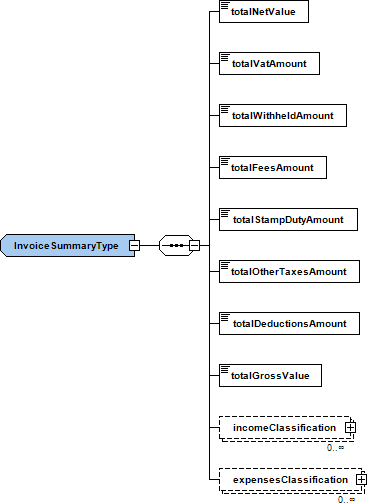
Field Type Required Description Valid values totalNetValue xs:decimal Yes Total net value Min value = 0 Decimal digits = 2 totalVatAmount xs:decimal Yes Total VAT amount Min value = 0 Decimal digits = 2 totalWithheldAmount xs:decimal Yes Total withholding taxes amount Min value = 0 Decimal digits = 2 totalFeesAmount xs:decimal Yes Total fees amount Min value = 0 Decimal digits = 2 totalStampDutyamount xs:decimal Yes Total digital transaction fee Min value = 0 Decimal digits = 2 totalOtherTaxesAmount xs:decimal Yes Total other taxes amount Min value = 0 Decimal digits = 2 totalDeductionsAmount xs:decimal Yes Total deductions amount Min value = 0 Decimal digits = 2 totalGrossValue xs:decimal Yes Total gross value Min value = 0 Decimal digits = 2 incomeClassification IncomeClassificationType No Income classification expensesClassification ExpensesClassificationType No Expenses classification Remarks
- Elements incomeClassification and expensesClassification contain the sums of all combinations of fields classificationType and classificationCategory that exist in the details of the invoice.
- All tax summary fields contain the summary of corresponding taxes of the details of the invoice or in the taxesTotals element.
- totalGrossValue = totalNetValue + totalVatAmount + totalFeesAmount + totalStampDutyamount + totalOtherTaxesAmount – totalWithheldAmount
- Income classification
Element IncomeClassificationType which contains the income classification has the following structure: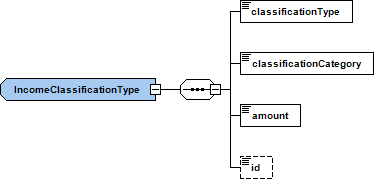
Field Type Required Description Valid values classificationType xs: string Yes Classification type Possible values of fields are described in the appendix classificationCategory xs: string Yes Classification category Possible values of fields are described in the appendix amount xs:decimal Yes Amount Min value = 0 Decimal digits = 2 id xs:byte No Serial number of classification Used for serial numbering (1,2,3… etc.) of the classifications of a row Remarks
- Due to sending documents through a Provider, it is not necessary to send a classification.
- The id field is used for serial numbering (1,2,3…etc) of the designations within a line
- Per myDATA §5.8 / §8.8–8.9: for income documents (
invoiceType1.x, 11.x, etc.) declarexmlns:N1="https://www.aade.gr/myDATA/incomeClassificaton/v1.0"onInvoicesDoc. Do not useN2.
- Expenses classification
Element ExpensesClassificationType which contains the expenses classification has the following structure: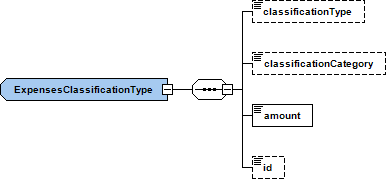
Field Type Required Description Valid values ClassificationType xs: string Yes Classification type Possible values of fields are described in the appendix classificationCategory xs: string Yes Classification category Possible values of fields are described in the appendix amount xs:decimal Yes Amount Min value = 0 Decimal digits = 2 id xs:byte No Serial number of classification Used for serial numbering (1,2,3… etc.) of the classifications of a row Remarks
- Due to sending documents through a Provider, it is not necessary to send a classification.
- Per myDATA §5.9 / §8.10–8.11: for expense documents — e.g.
<invoiceType>2.1</invoiceType>(service invoice) and generally 2.x types — declarexmlns:N1="https://www.aade.gr/myDATA/expensesClassificaton/v1.0"onInvoicesDoc. Do not useN2; useN1only with the expenses schema.
- Details
The issuer and the counterpart are elements of type PartyType.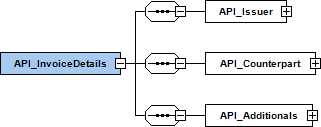
Field Type Required Description Valid values API_Issuer API_IssuerType Yes API_Issuer API_Counterpart API_CounterpartType Yes API_Counterpart API_Additionals API_AdditionalsType Yes API_Additionals - Issuer
Element API_IssuerType which contains the following structure: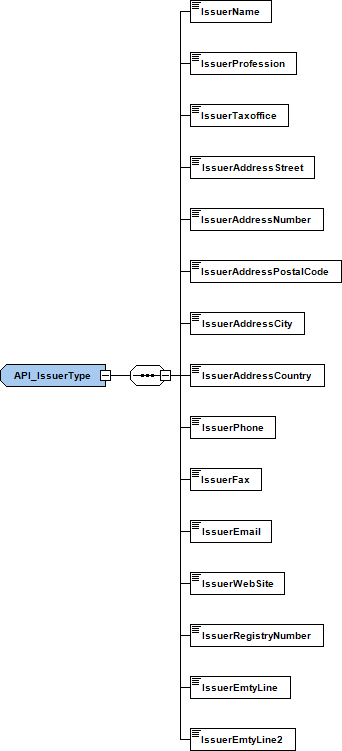
Field Type Required Valid values IssuerName xs: string Yes Invoice fields described in «Document structure, examples and tools» IssuerProfession xs: string Yes Invoice fields described in «Document structure, examples and tools» IssuerTaxOffice xs: string Yes Invoice fields described in «Document structure, examples and tools» IssuerAddressStreet xs: string Yes Invoice fields described in «Document structure, examples and tools» IssuerAddressNumber xs: string Yes Invoice fields described in «Document structure, examples and tools» IssuerAddressPostalCode xs: string Yes Invoice fields described in «Document structure, examples and tools» IssuerAddressCity xs: string Yes Invoice fields described in «Document structure, examples and tools» IssuerAddressCountry xs: string Yes Invoice fields described in «Document structure, examples and tools» IssuerPhone xs: string No Invoice fields described in «Document structure, examples and tools» IssuerFax xs: string No Invoice fields described in «Document structure, examples and tools» IssuerEmail xs: string Yes Invoice fields described in «Document structure, examples and tools» IssuerWebSite xs: string No Invoice fields described in «Document structure, examples and tools» IssuerRegistryNumber xs: string No Invoice fields described in «Document structure, examples and tools» IssuerEmtyLine xs: string No Invoice fields described in «Document structure, examples and tools» IssuerEmtyLine2 xs: string No Invoice fields described in «Document structure, examples and tools» - Counterpart
Element API_ConterpartType which contains the following structure: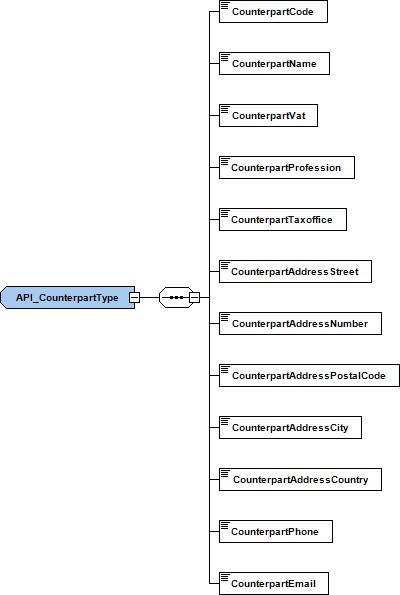
Field Type Required Valid values CounterpartCode xs: string No Invoice fields described in «Document structure, examples and tools» CounterpartName xs: string Yes Invoice fields described in «Document structure, examples and tools» CounterpartVat xs: string No Used on demand only if invoiceType is 11.1 or 11.2 CounterpartProfession xs: string Yes Invoice fields described in «Document structure, examples and tools» CounterpartTaxOffice xs: string Yes Invoice fields described in «Document structure, examples and tools» CounterpartAddressStreet xs: string Yes Invoice fields described in «Document structure, examples and tools» CounterpartAddressNumber xs: string Yes Invoice fields described in «Document structure, examples and tools» CounterpartAddressPostalCode xs: string Yes Invoice fields described in «Document structure, examples and tools» CounterpartAddressCity xs: string Yes Invoice fields described in «Document structure, examples and tools» CounterpartAddressCountry xs: string No Invoice fields described in «Document structure, examples and tools» CounterpartPhone xs: string No Invoice fields described in «Document structure, examples and tools» CounterpartEmail xs: string No Invoice fields described in «Document structure, examples and tools» - Additionals
Element API_AdditionalsType which contains the following structure: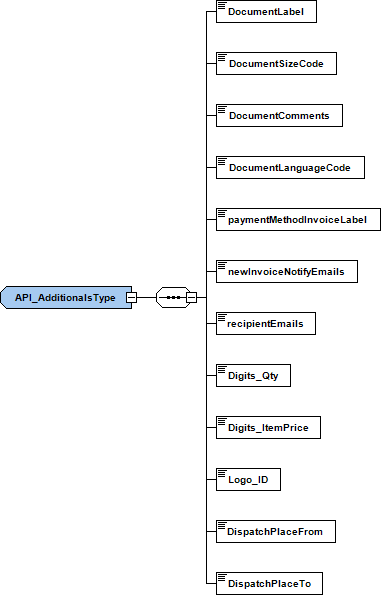
Field Type Required Valid values DocumentLabel xs: string Yes Invoice type description, described in «Document structure, examples and tools» DocumentComments xs: string No The comments of the invoice, described in «Document structure, examples and tools» paymentMethodInvoiceLabel xs: string Yes The description of the payment type, described in «Document structure, examples and tools» Logo_ID xs: string No Default ID = 1. Can be set on API Portal DispatchPlaceFrom xs: string No The dispatch origin place DispatchPlaceTo xs: string No The dispatch destination place DispatchMethod xs: string No Shipping method docTime xs: string No Time of issuance of document b2g xs:boolean For B2G only Yes Yes, no on whether it concerns a document payable to the government buyerIdentifier xs: string For B2G only
YesThe contracting authority contractReference xs: string For B2G only
YesRegistry Online Authorisation Reference Number projectReference xs: string For B2G only
YesContract identifier
- Issuer
- Additionals
- Data retrieval
The call has the following characteristics:- /requesttransmitteddocs.php (GET)
- Forwards the Provider
RequestTransmittedDocscall to AADE and returns the AADE response body as-is.
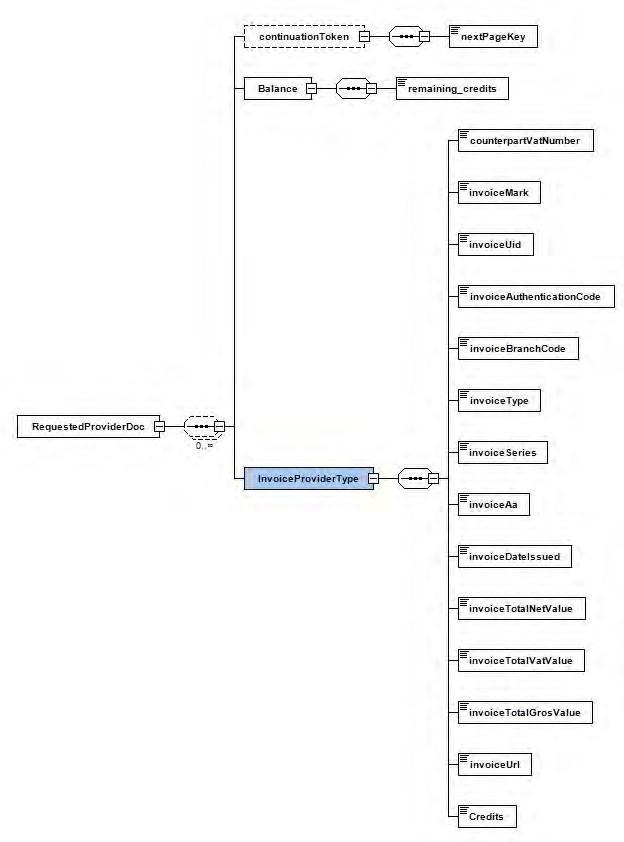
Field Type Required Description issuerVAT xs:long Yes Issuer VAT (query parameter); forwarded to AADE as issuervatmark xs:long Yes Unique Invoice Registration Number (required by AADE). Forwarded as Mark; returns documents with MARK greater than this valuemaxMark xs:long No If set, returns records with MARK less than or equal to this value nextPartitionKey xs:string No Partial-retrieval parameter forwarded to AADE. Use the value from the previous response continuationTokennextRowKey xs:string No Partial-retrieval parameter forwarded to AADE. Use the value from the previous response continuationTokenRemarks:
- A valid
Api-Keyheader is required. SBZ checks that the key exists; it does not locally compareissuerVATto the account VAT. - Sandbox is selected only with
action=sandbox(_sand_in the key does not auto-switch this call). - AADE parameters
nextPartitionKey/nextRowKeyare forwarded to AADE when provided. If the response containscontinuationToken, call again with the same parameters plus those keys for the next page. - An invalid Api-Key returns a JSON message with
statusCode5006 (not XML).
Endpoints
Production environment
Sandbox environment
Field Type Required Description continuationToken continuationTokenType No Partial retrieval element (if AADE returns it) InvoiceProviderType InvoiceProviderType No List of transmitted document entries (AADE structure) issuerVAT xs:string Yes* Document issuer VAT (*inside each InvoiceProviderType, when present) invoiceProviderMark xs:long Yes* Document MARK invoiceUid xs:string Yes* Document UID authenticationCode xs:string Yes* Provider authentication code Remarks:
- Retrieval covers documents of the issuer requested with
issuerVAT, not documents issued “to you” by other issuers. - Parameters
nextPartitionKey/nextRowKeyare forwarded to AADE when you send them on the SBZ call. - If AADE returns
continuationToken, use itsnextPartitionKey/nextRowKeyon your next SBZ call (SBZ does not auto-follow pages).
- Unit balance check
With aGETtocheck_balance.phpyou receive the account unit balance as plain text (not XML). Pass the API key in theuserquery parameter (productionapikey, or sandboxapikey_sandboxwhen the key starts withsbz_sand_).
1https://api.sbz.gr/check_balance.php?user=YOUR_API_KEY
Remarks:- Success: HTTP 200 and a body that is only the units number (e.g.
9502). - Invalid or unknown key: HTTP 403.
- Per-user limit: at most one fresh read every 60 seconds; within that minute the last known balance is returned.
- Per-IP limit: up to 30 calls / 60 seconds; over the limit HTTP 429.
- Success: HTTP 200 and a body that is only the units number (e.g.
- Data retrieval