
Skip to content
  • EN
    • GR
Call us now! +44 (0) 2037347158
SBZ Systems
  • Software
  • Electronic Invoicing
    • Certified eInvoicing B2B & B2C
    • Business to Government – B2G
    • Login
    • Sign up
    • Document Verification
    • myDATA E-invoicing Service Providers Status
  • The company
    • News
    • About us
    • Partners
    • Contact
    • Client area
  • Support
    • EMDI
    • EMDI web
    • EMDI Transit
    • Zeni Chatbot
    • SBZ staff
    • Electronic Signatures
    • General Issues
    • Remotely
    • Out of Working Hours Support
    • myDATA Status

More results...

Filter by Categories
General Issues
News
Services
Software Solutions
Support - Electronic Signatures
  • Software
  • Electronic Invoicing
    • Certified eInvoicing B2B & B2C
    • Business to Government – B2G
    • Login
    • Sign up
    • Document Verification
    • myDATA E-invoicing Service Providers Status
  • The company
    • News
    • About us
    • Partners
    • Contact
    • Client area
  • Support
    • EMDI
    • EMDI web
    • EMDI Transit
    • Zeni Chatbot
    • SBZ staff
    • Electronic Signatures
    • General Issues
    • Remotely
    • Out of Working Hours Support
    • myDATA Status

More results...

Filter by Categories
General Issues
News
Services
Software Solutions
Support - Electronic Signatures
Certified Electronic Invoicing Provider

Set purchase price by document

  • Post published:13/03/2018
  • Post category:Invoices / Payments / Products / Services (Inventory) / Settings

When you enter a purchase receipt, the prices you have specified in its items are recorded as a purchase price.
This feature is enabled in the settings by checking the “Purchase price from document” option.
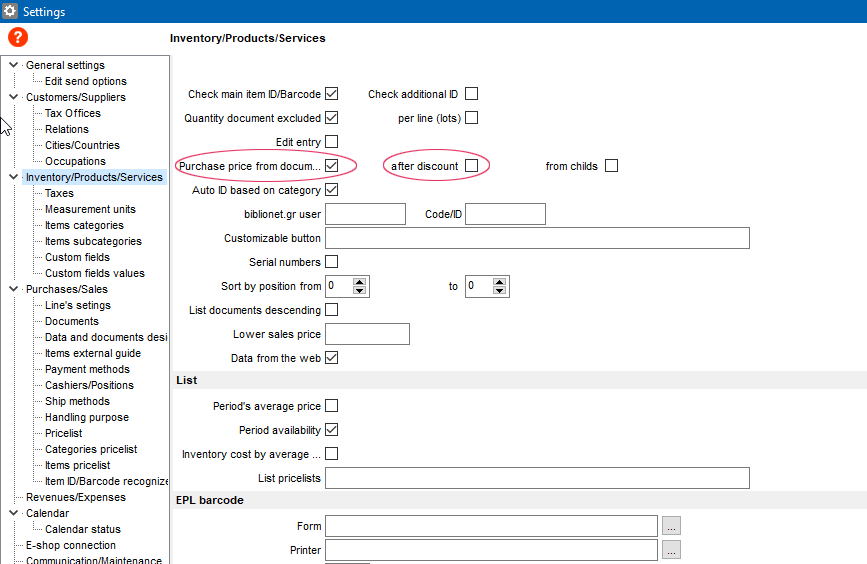
If the price to be set must be the final, after deduction, then check the “after discount” option.

The price is set only for “Purchase / Import Goods”, “Purchase / Non-Movement” and “Yes”, “Only VAT” quotes.

Categories

  • Support - EMDI - Business Management
    • Accounting / Reports
    • Appointments / Reminders
    • Customers / Suppliers
    • Data Import
    • Database Synchronisation
    • Delivery / Orders
    • Devices Synchronisation
    • Fitness
    • Installation / Uninstallation / Issues
    • Invoices / Payments
    • Ordering Monitor
    • Parking
    • Products / Services (Inventory)
    • Reservations
    • Settings

Latest

  • Save changes when the document type changes
  • Matching for Compensation Invoice
  • Matching for Tobacco
  • Matching for Delivery Note
  • Matching for Inorganic Revenue Invoice (Compensation)
  • Matching for Fixed Asset Invoice
  • Matching for Rent
  • Matching for VAT Refund Credit Invoice (VAT only)
  • Reconciliation for Invoice – Supplementary document (VAT only)
  • Reconciliation of deductions also for Article 22

SBZ SYSTEMS

20 Iasonidou Str. (1st floor)
16777 Elliniko, Athens, Greece
Tel.: +30 2118002930
Operating hours
Monday - Friday
09:00 – 18:00

SUPPORT

  • General
  • Pricing Policy
  • Remote
  • Client Area

COMPANY

  • About
  • News
  • Quality Management
  • Contact

OTHER

  • Sitemap
  • Jobs
  • Information Security Policy
  • Terms & Conditions
Quality Management Member of SEPE Member of EETT
                   

Copyright © 2026 - SBZ Systems