


In EMDI Park you set parking charges with rules by minutes, hours, and weekdays. The rules repeat every day inside the time window you define.
Who uses this: anyone who configures parking services in Inventory and issues entry/exit tickets in EMDI Park.
Before you start
- Open the parking service in Inventory (for example “TRANSIENT PARKING”).
- Make sure the service belongs to the parking subcategory set in
park.ini. - For time-based charging, set the retail price = 0. If retail is greater than 0, Park charges that fixed price (with VAT) and ignores the time rules.
Where you enter the charges
Write every charge line in the service detailed description in Inventory (notes field).
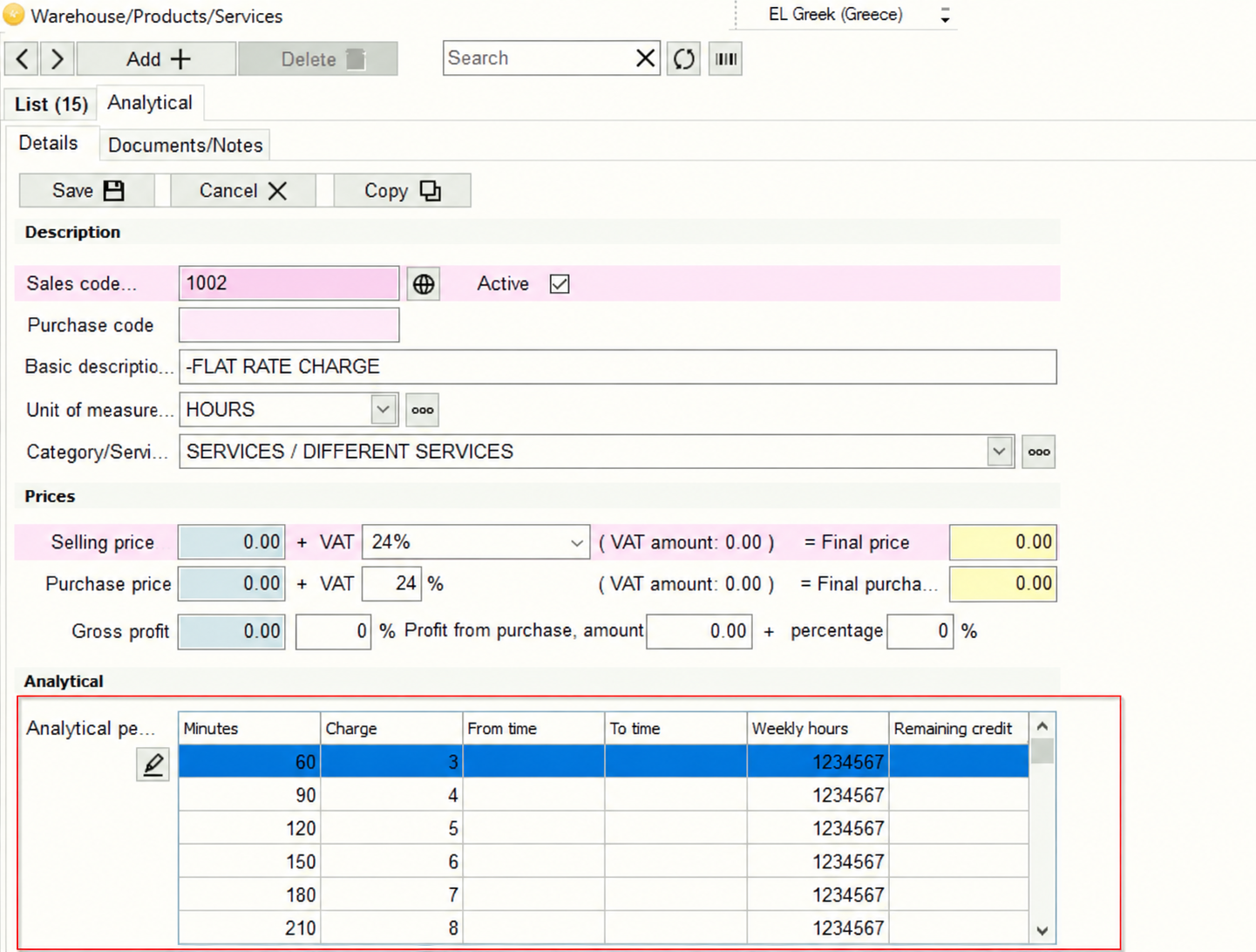
For easier editing, use the grid toggle button (text / table). When the service is in the parking subcategory, these columns appear automatically:
- Minutes — up to how many minutes this line applies (e.g. 60 = 1 hour).
- Charge — amount in euro for that tier.
- From time — start of the time window (e.g. 8:00).
- To time — end of the time window (e.g. 22:29). If “From” is after “To” (e.g. 22:30 to 7:59), it covers overnight.
- Days of week — digits 1–7 with no spaces (optional; the sample uses
1234567for every day). - Next charge — optional amount used only on the first day of stay (instead of the “Charge” column).
Separate fields with |. Do not leave blank lines.
 How the charge is chosen
For each time window (from–to + weekdays), Park counts the parked minutes inside that window and applies the first line of the same zone where minutes are less than or equal to the “Minutes” column. Enter tiers in ascending minute order (smaller minutes first).
A separate window (for example overnight) is added as an extra charge because it uses different hours.
Daytime + overnight example
Below: tiers for 08:00–22:29 plus a separate overnight charge 22:30–7:59, every day.
5|0|8:00|22:29|1234567
125|1|8:00|22:29|1234567
185|2|8:00|22:29|1234567
245|3|8:00|22:29|1234567
305|4|8:00|22:29|1234567
365|5|8:00|22:29|1234567
425|6|8:00|22:29|1234567
875|7|8:00|22:29|1234567
570|5|22:30|7:59|1234567
Weekday numbering
In “Days of week”, enter the digits with no spaces. Numbering is:
- Sunday
- Monday
- Tuesday
- Wednesday
- Thursday
- Friday
- Saturday
Example: Saturday–Sunday only → 17. Every day → 1234567.
Different charge on the first day
If the first day needs a different amount, fill the 6th column (“Next charge”). It applies only to the first stay segment; later days use the normal “Charge”.
5|0|8:00|22:29
65|1|8:00|22:29|1234567|3
125|2|8:00|22:29|1234567|3
185|3|8:00|22:29|1234567|4
245|4|8:00|22:29|1234567|5
305|5|8:00|22:29|1234567|6
365|6|8:00|22:29|1234567|7
425|7|8:00|22:29|1234567|8
485|8|8:00|22:29|1234567
875|9|8:00|22:29|1234567
570|5|22:30|7:59|1234567
Tips
- Important: do not leave blank lines in the charges.
- Do not put spaces around
|. - Use times as
H:MMorHH:MM(e.g.8:00,22:30). - After saving in Inventory, test an entry/exit in EMDI Park to confirm the amount.