Skip to content
  • EN
    • GR
Call us now! +44 (0) 2037347158
SBZ Systems
  • Software
  • Electronic Invoicing
    • Certified eInvoicing B2B & B2C
    • Business to Government – B2G
    • Login
    • Sign up
    • Document Verification
    • myDATA E-invoicing Service Providers Status
  • The company
    • News
    • About us
    • Partners
    • Contact
    • Client area
  • Support
    • EMDI
    • EMDI web
    • EMDI Transit
    • Zeni Chatbot
    • SBZ staff
    • Electronic Signatures
    • General Issues
    • Remotely
    • Out of Working Hours Support
    • myDATA Status

More results...

Filter by Categories
General Issues
News
Services
Software Solutions
Support - Electronic Signatures
  • Software
  • Electronic Invoicing
    • Certified eInvoicing B2B & B2C
    • Business to Government – B2G
    • Login
    • Sign up
    • Document Verification
    • myDATA E-invoicing Service Providers Status
  • The company
    • News
    • About us
    • Partners
    • Contact
    • Client area
  • Support
    • EMDI
    • EMDI web
    • EMDI Transit
    • Zeni Chatbot
    • SBZ staff
    • Electronic Signatures
    • General Issues
    • Remotely
    • Out of Working Hours Support
    • myDATA Status

More results...

Filter by Categories
General Issues
News
Services
Software Solutions
Support - Electronic Signatures
Certified Electronic Invoicing Provider

Print Customer Balance

  • Post published:12/08/2024
  • Post category:Accounting / Reports / EMDI - Business Management

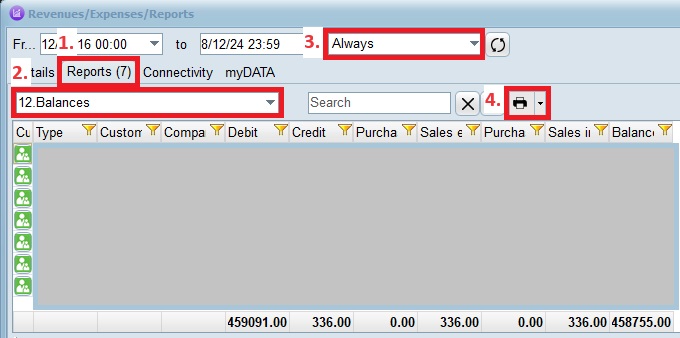
From the starting menu, go to Reports(purple icon). Press the “Reports” tab,  select “12. Balances”, then “Always” on the timetable and finally the printer icon.
Tags: balance, customer, customer balance, print, εκτύπωση

Categories

  • Support - EMDI - Business Management
    • Accounting / Reports
    • Appointments / Reminders
    • Customers / Suppliers
    • Data Import
    • Database Synchronisation
    • Delivery / Orders
    • Devices Synchronisation
    • Fitness
    • Installation / Uninstallation / Issues
    • Invoices / Payments
    • Ordering Monitor
    • Parking
    • Products / Services (Inventory)
    • Reservations
    • Settings

Latest

  • Export files for a General Ledger program
  • Important settings for connection to General Ledger
  • myDATA – Intra-Community Acquisitions – Invoices
  • Sending Third-Country Invoices to myDATA and Provider
  • Setting up and using secondary VAT by customer/supplier to separate takeaway and retail (tables)
  • Configuring the myDATA Quantitative Receipt Note in EMDI
  • Resubmitting a Document to myDATA or the E-Invoicing Provider
  • Self-Billing Invoice Setup in EMDI
  • New EMDI Feature: Automatic Purchase Invoice Import from myDATA
  • Connection Instructions POS Ingenico MELLON: NBG, NEXI, Attica Bank

SBZ SYSTEMS

20 Iasonidou Str. (1st floor)
16777 Elliniko, Athens, Greece
Tel.: +30 2118002930
Operating hours
Monday - Friday
09:00 – 18:00

SUPPORT

  • General
  • Pricing Policy
  • Remote
  • Client Area

COMPANY

  • About
  • News
  • Quality Management
  • Contact

OTHER

  • Sitemap
  • Jobs
  • Information Security Policy
  • Terms & Conditions
Quality Management Member of SEPE Member of EETT
                   

Copyright © 2026 - SBZ Systems
