


In Settings → Purchases/Sales there are two related options, Action none, with balances and related copy.
Together they let you work with orders and delivery notes without copying again items that have already moved to later documents, and where needed show the correct customer balance. Especially useful after a goods movement delivery note (dispatch note without prices / Δελτίο Διακίνησης): with copy With pending quantities or with the report below you can see which products are not invoiced yet.
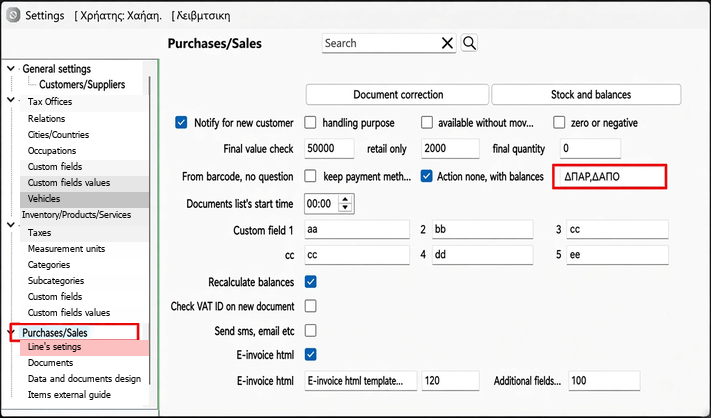
In the related copy field type or select the abbreviation that appears in the Related document field of the document that has been issued. You can enter several abbreviations separated by commas, e.g. ΔΠΑΡ,ΔΑΠΟ, when you use both an Order form (ΔΠΑΡ) and a Delivery / movement note without prices (ΔΑΠΟ).
On each copy, only the abbreviation of the document you are copying is used. If you copy order ΔΠΑΡ 001#100, quantities are subtracted based on documents whose Related field states ΔΠΑΡ 001#100; if you copy delivery note ΔΑΠΟ 002#50, they are subtracted based on ΔΑΠΟ 002#50. The two chains do not affect each other, even if they share the same series or number.
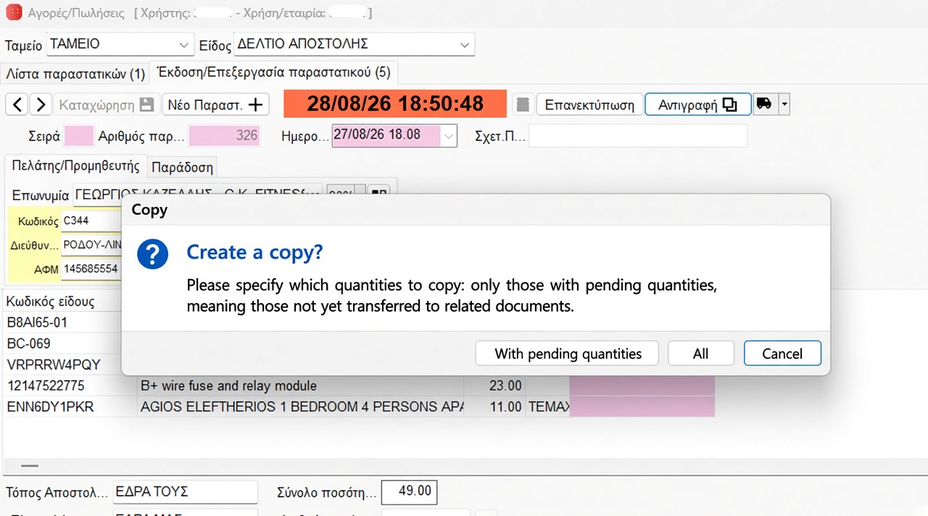
The check is enabled on documents with no stock movement (e.g. orders) and on delivery notes without prices shown (including the goods movement delivery note). When you press Copy on such a document, this question appears:
- With pending quantities — only lines with a positive remaining quantity are copied (after subtracting those already moved to related documents).
- All — full copy of every line.
- Cancel — no copy is made.
For the calculation to work correctly, later documents (invoices, etc.) must have the source reference in Related document (e.g. ΔΑΠΟ 002#50 when they come from the delivery note). If you copy a delivery note to invoice only what has not been invoiced yet, enter the abbreviation of the delivery / movement note in the setting, not the invoice’s.
Report 02.Pending items for issue
The report 02.Pending items for issue shows the same pending quantities in an overview: no-movement documents or delivery notes without prices, with remaining quantity > 0. It uses a related abbreviation like the related copy field; use the same abbreviation (e.g. ΔΑΠΟ for the movement delivery note) to see what is still left to invoice.
The Action none, with balances option concerns printing documents with no movement (e.g. orders). When it is enabled, the current total of the document is added to the customer’s old balance in the balance field of the form, so the updated balance after the order is visible without an invoice or stock movement having been issued yet.